
SN | Guru Blog
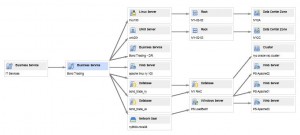
One of the great features of Service-now.com is its CMDB and relational mapping. You can easily set up relationships between any CIs in the system. Once the relationships are defined, it becomes very simple to pull up a visual representation of a CI and its dependencies by using Service-now BSM maps. Using this feature allows an end user to look at that CI and identify what else in the environment is impacted by an outage or a change to that CI.

System security is probably one of the more challenging things
With the introduction of the 'Database Storage for Images' plugin in the Spring 2009 release, administrators have the ability to customize virtually any image in their Service-now instance. Although you'll rarely have to customize any Service-now images other than your header logo, it is nice to have the option if you need it.
-
One common problem I encounter with Service-now deployments has to do with the sharing of a field between many tables extended off of the same parent table. Because the Task table and the Configuration Item table make heavy use of extended tables this is where I see the problem most often. What is the best way to make changes to a shared field for the table that I'm working on, but not impact other tables that may be using the same field?
-
If you're new to Service-now you're probably realizing that there are a lot of cool things that you can do with the product. In most cases, the functionality you need is already set up and ready to go. Other things can be accomplished by installing a plugin that fits your particular need. In my experience, there are a few plugins that end up being used (or should be used) on almost every Service-now.com installation.
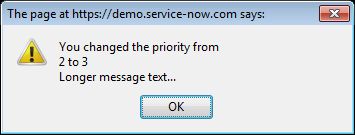
Standard JavaScript provides 3 different types of popup boxes: Alert box, Confirm box, and Prompt box. Since Service-now.com supports standard JavaScript, these popup boxes can be used anywhere in the application where client-side JavaScript is supported. They will most commonly be used in an 'onSubmit' client script or a UI action with the 'Client' checkbox checked.
-
Exhibit A: As if Mr. Clippy isn’t reason enough, here
-
It is very common to use graphical workflow to help facilitate some change management process within your organization. One common requirement in change management is to be able to cancel or close the change request at any time during the process. "Simple", you say. "Just allow the user to change the value of the 'State' field to 'Closed'." You would not be incorrect in saying something like that, but you would be forgetting about part of the problem with closing or canceling a change request or other task ticket.
-
It is possible to use custom CSS and HTML to completely customize the look of the header in your instance.
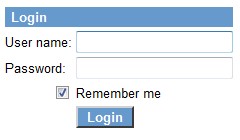
For some Service-now.com implementations, there may be a need to modify the default login page. In other implementations, it may be necessary or desirable to remove the login page altogether (this scenario would only apply if you have set up Single sign-on for your instance and you didn't want users to authenticate directly against Service-now). Whatever the reason is, you may find it necessary to modify the behavior of the Service-now login page. If you do, there are a couple of options I would recommend.
-
When implementing the Change management process in Service-now you'll probably encounter a scenario where your entire change workflow (including all tasks and approvals) needs to be reset. The first option to consider (assuming you're using the graphical workflow engine to manage the tasks and approvals) is the Rollback workflow activity. The rollback activity works great for a lot of scenarios, but what if you don't have a defined point in the workflow where everything should be rolled back? What if the rollback (or reset) can happen at any point in time? There's not really an easy way to handle this within the workflow itself since you would need to check for a rollback condition at an infinite number of places.


Fresh Content
Direct to Your Inbox
Just add your email and hit subscribe to stay informed.

Santosh Sahoo says:
Christoph L. says:
Martin Ivanov says: