
String fields typically aren't any thing to get too worked up over, but I've discovered a couple of cool tips on dealing with string fields in Service-now.com that might benefit somebody else at some point.

One common problem I encounter with Service-now deployments has to do with the sharing of a field between many tables extended off of the same parent table. Because the Task table and the Configuration Item table make heavy use of extended tables this is where I see the problem most often. What is the best way to make changes to a shared field for the table that I'm working on, but not impact other tables that may be using the same field?
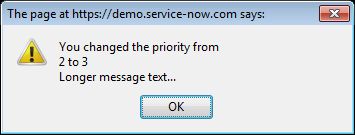
Standard JavaScript provides 3 different types of popup boxes: Alert box, Confirm box, and Prompt box. Since Service-now.com supports standard JavaScript, these popup boxes can be used anywhere in the application where client-side JavaScript is supported. They will most commonly be used in an 'onSubmit' client script or a UI action with the 'Client' checkbox checked.
-
When implementing the Change management process in Service-now you'll probably encounter a scenario where your entire change workflow (including all tasks and approvals) needs to be reset. The first option to consider (assuming you're using the graphical workflow engine to manage the tasks and approvals) is the Rollback workflow activity. The rollback activity works great for a lot of scenarios, but what if you don't have a defined point in the workflow where everything should be rolled back? What if the rollback (or reset) can happen at any point in time? There's not really an easy way to handle this within the workflow itself since you would need to check for a rollback condition at an infinite number of places.

By default, Service-now displays the same window title information all of the time no matter what you're looking at within the application. This isn't normally an issue, but it can be frustrating if, like me, you work with multiple browser tabs open that all have something to do with Service-now.
-
This should resonate with any of you who have a help desk background like I do.


Since 2009, ServiceNow Guru has been THE go-to source of ServiceNow technical content and knowledge for all ServiceNow professionals.
QUICK MENU
LATEST BLOGS
TAGS
© Copyright 2009 – 2024 | All Rights Reserved