
Automatically Filter Report Homepage
I just figured out a cool little reporting feature today that might end up helping somebody. On the reports homepage (‘report_home.do’) in Service-now.com, users have the ability to type filter text to restrict the types of reports that they see. So, if I wanted to see just those reports on the ‘Change request’ table, I could simply type ‘change request’ for my filter text as shown below…
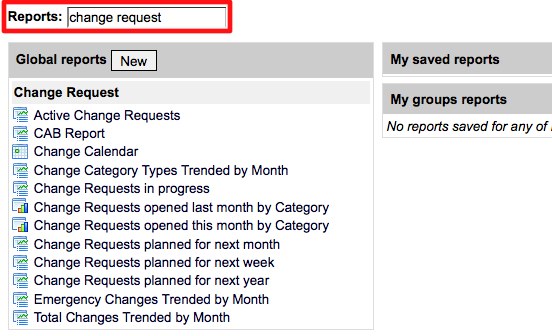
Now for the cool part… This filter text can actually be passed over a URL as a parameter to automatically bring a user to a filtered report homepage view. This might be useful if you wanted to create a UI action on the change request table that brought the user to the change request reports when clicked for example.
The parameter is ‘sysparm_reportquery’ and is used like this in a URL…
To navigate to the report homepage without navigation (filtering on ‘change request’)
https://demo.service-now.com/report_home.do?sysparm_reportquery=change request
To navigate to the report homepage with navigation (filtering on ‘change_request’)
https://demo.service-now.com/nav_to.do?uri=report_home.do?sysparm_reportquery=change request
Filtering on additional report attributes with a hidden background filter
You can also use the regular ‘sysparm_query’ parameter just like you would in a module or filter definition to filter a list of records. This might be useful for filtering on other attributes on the report definition. For example, if I wanted to show a list of just Pie Chart reports in the system WITHOUT having my query appear in the filter box, I could set up my report page URL like this…
https://demo.service-now.com/nav_to.do?uri=report_home.do?sysparm_query=type=pie

Date Posted:
July 23, 2010
Share This:
7 Comments
Comments are closed.



Fresh Content
Direct to Your Inbox
Just add your email and hit subscribe to stay informed.

It’s helpful. :)
I wonder what I could put in query if I wanted something from filter.
for example filter is
Stage is achieved
You can do that as long as you target a specific report using the ‘sysparm_query’ parameter. I’ve built an example of this using a calendar report in a popup. Check out this post for details.
https://servicenowguru.com/scripting/client-scripts-scripting/ci-change-calendar-macro/
Is there any way we can sort reports page in alphabetical order of Tables?
No way that I’m aware of. The report page can’t really be modified unfortunately.
Is there a way to make the url something dymanic, i.e. only show reports where the current user has permissions to see them?
You’re pretty much limited to a text filter as far as I know. Displaying only reports where the user has permissions is the standard behavior though so you shouldn’t need anything different to do that.
Very good trick guys.
But on some instance it doesn’t seem to work.
Any idea why? Is there any system properties about this?
thanks