
Using Import Sets for REST Integration in ServiceNow
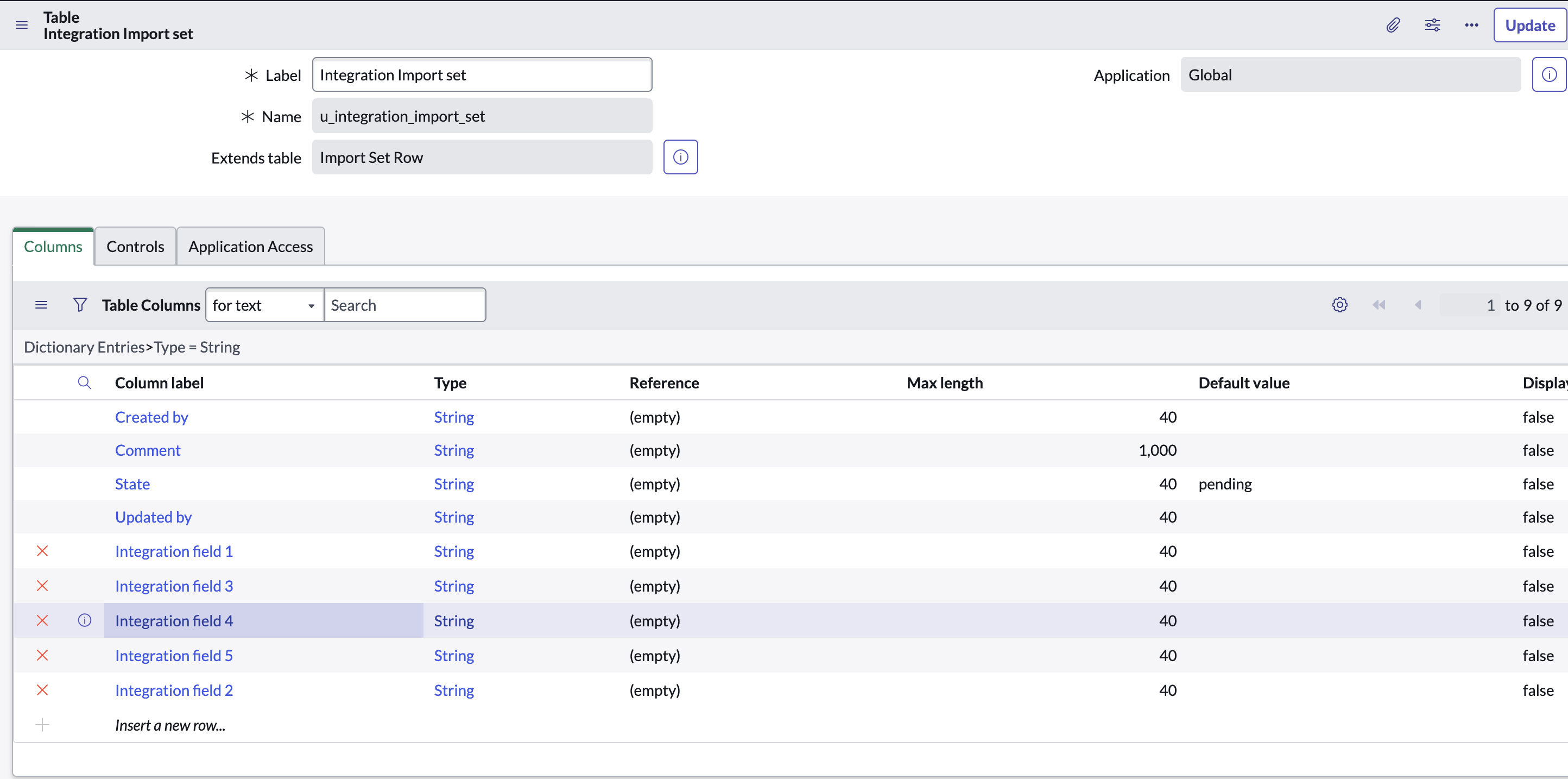
Integrating data from external sources into ServiceNow is a common requirement for organizations aiming to maintain a unified system of record. One effective method for achieving this is through the use of Import Sets, which can be enhanced using REST APIs for seamless data transfer. In this blog post, we will explore how to use Import Sets for REST integration in ServiceNow, focusing on key components such as Transform Maps, Transform Scripts, and the Import Set API.
What are Import Sets?
Import Sets in ServiceNow are used to import data from various data sources and map that data into ServiceNow tables. They act as staging tables where raw data is initially stored before being processed and transformed into the target tables in ServiceNow.
Transform Maps
Definition
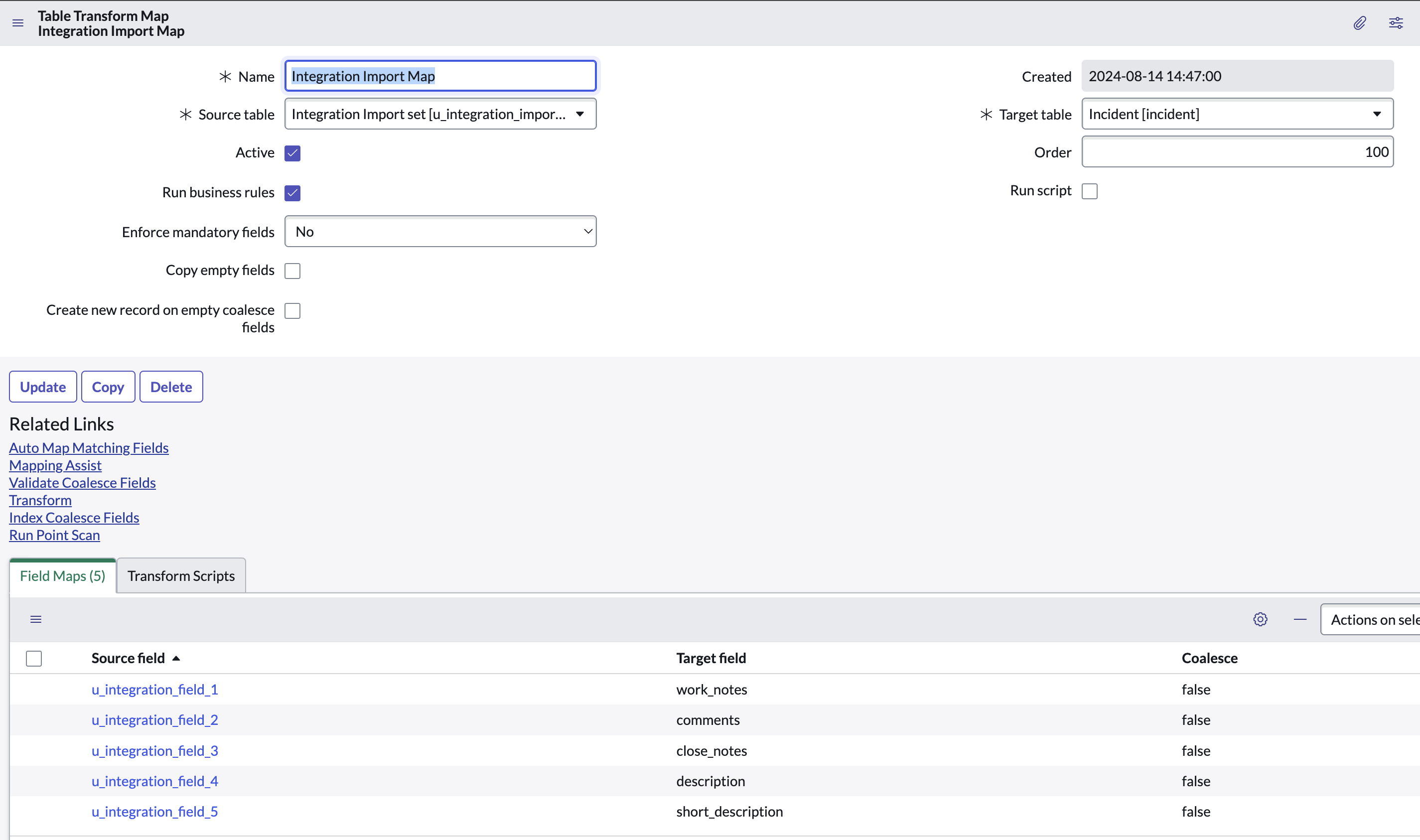
A Transform Map is a set of field mappings that determines the relationships between fields in an import set and fields in the target table. Transform Maps ensure that the data imported from the staging table is correctly mapped and transferred to the desired table in ServiceNow.
Creating Transform Maps
- Navigate to: System Import Sets > Administration > Transform Maps.
- Click on New to create a new transform map.
- Provide a name for the Transform Map and select the source Import Set Table and the Target Table.
- Define field mappings by adding field map records, specifying the source field from the Import Set Table and the target field in the ServiceNow table.
Transform Maps Validation
- Ensure the Transform Map is reusable by defining source and target tables that can be applied to multiple data imports.
- Use the Auto Map Matching Fields feature to automatically map fields with the same name.
- Validate the field mappings by testing with sample data to ensure accuracy.
Transform Scripts
Definition
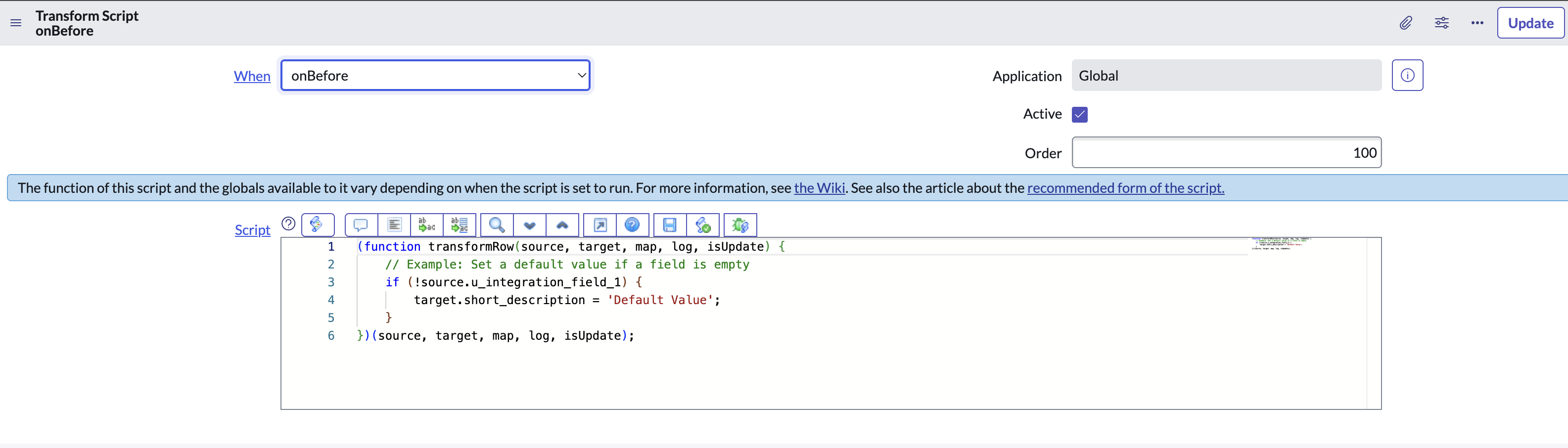
Transform Scripts are server-side JavaScript that can be used to manipulate data during the transformation process. These scripts provide additional flexibility to handle complex data transformations and custom logic.
Types of Transform Scripts
- onBefore: Executed before any record is processed.
- onStart: Executed at the start of the transformation.
- onAfter: Executed after each record is processed.
- onComplete: Executed after all records have been processed.
Example Usage
// Example: Set a default value if a field is empty
if (!source.field_name) {
target.field_name = ‘Default Value’;
}
})(source, target, map, log, isUpdate);
The Import Set API allows for the import of data into ServiceNow from external sources using RESTful web services. This API provides endpoints to create, update, and delete records in Import Set Tables.
Key Endpoints
- POST /api/now/import/{table_name}: Import data into a specified Import Set Table.
- GET /api/now/import/{table_name}: Retrieve data from a specified Import Set Table.
- PUT /api/now/import/{table_name}/{sys_id}: Update a record in a specified Import Set Table.
- DELETE /api/now/import/{table_name}/{sys_id}: Delete a record from a specified Import Set Table.
Example Usage
To import data into an Import Set Table using REST, you can use the following example:
Request:
POST /api/now/import/u_my_import_table
Content-Type: application/json
Authorization: Bearer {your_token}{
“field1”: “value1”,
“field2”: “value2”,
…
}
Response:
{
“status”: “success”,
“sys_id”: “1234567890abcdef”
}
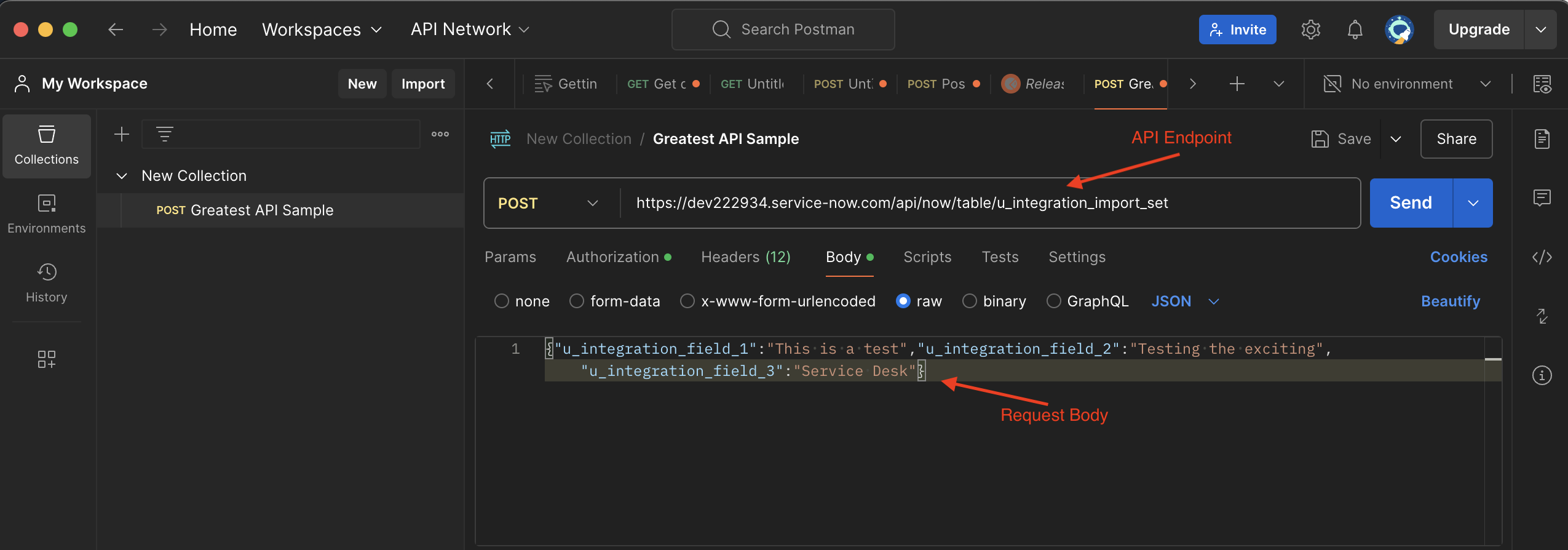
Sample REST API Call using PostMan
Integrating It All Together
- Setup Import Set Table: Create or identify the Import Set Table where data will be initially stored.
- Define Transform Map: Create and configure a Transform Map to map fields from the Import Set Table to the target table.
- Write Transform Scripts: Add any necessary Transform Scripts to handle custom logic and data manipulation.
- Use Import Set API: Utilize the Import Set API to import data from external sources into the Import Set Table.
- Run Transform: Execute the Transform Map to move data from the Import Set Table to the target table, applying any Transform Scripts in the process.
Conclusion
Using Import Sets for REST integration in ServiceNow provides a robust solution for importing and transforming data from various external sources. By leveraging Transform Maps and Transform Scripts, you can ensure that data is accurately and efficiently mapped to your ServiceNow tables. The Import Set API further enhances this process by allowing seamless integration through RESTful web services. By following these best practices and utilizing the tools provided by ServiceNow, you can achieve a streamlined and effective data import process.

-
 GlideRecord Query Cheat SheetMay 20th, 2021
 -
 User Object Cheat SheetJune 23rd, 2021
 -
 Client & Server Code in One UI ActionMay 20th, 2021
-
 Be a Choice List “Thief”January 7th, 2025
 -
 We Need to Talk About WorkspacesDecember 5th, 2024
 -
 Implementing a Factory Pattern on ServiceNowDecember 5th, 2024
-

Santosh Sahoo says:
-
-

Martin Ivanov says:

Categories
- Announcements
- Architecture
- Authors
- Business rules
- Client scripts
- CMDB
- Content management
- Design
- Email Notifications
- General knowledge
- Generative AI
- Graphical workflow
- Hardware Asset Management
- Imports
- Integration
- ITAM
- Knowledge Management
- Miscellaneous
- Performance
- Relationships
- Releases
- Reporting
- Script includes
- Scripting
- Service Portal
- Single Sign-on
- System Definition
- System UI
- UI actions
- UI macros
- UI pages
- UI scripts
- Web Services
Tags
Related Posts

Fresh Content
Direct to Your Inbox
Just add your email and hit subscribe to stay informed.