
Refresh the Left Navigation Pane via Script
Here’s a quick scripting tip for today. Have you ever needed to refresh the left navigation menu in response to some script action? I don’t think this requirement comes up often, but I just had somebody ask me a question related to this so I figured I would find out how it can be done.
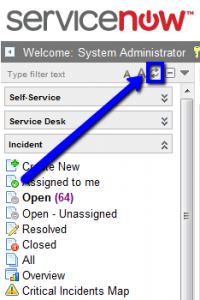
The code below is taken directly from a ServiceNow demo instance, and you can find it in your own instance as well. The server-side example comes from a business rule on the ‘sys_app_module’ table, and the client-side example comes from digging around in the DOM. :)
Server-side refresh trigger
–For use in business rules, UI actions, etc.
// tell the UI to refresh the navigator
var notification = new UINotification('system_event');
notification.setAttribute('event', 'refresh_nav');
notification.send();
Client-side refresh trigger
–For use in client scripts, UI policies, etc.
getNavWindow().location = 'navigator_change.do';
For another way to use UI Notifications, take a look at our article Display Messages With UI Notifications.

Date Posted:
May 22, 2012
Share This:
9 Comments
Comments are closed.


Fresh Content
Direct to Your Inbox
Just add your email and hit subscribe to stay informed.

Any chance we might get the other part of this code? I have actually been trying to get this number to appear beside the link where it actually shows how many active items are on that list. {in reference to the number “64” to the right of “Open” on the image}
What other part of the code are you referring to?
I’m thinking he means the Outlook-style module counts. William, check out another of Mark’s posts at https://servicenowguru.com/system-ui/outlook-style-module-counts/
Exactly, thanks Jim.
I will definitely be adding this to my instance.
I’m looking for a way to force a refresh for all users when I add or remove a nav pane option as part of releasing enhancements. How would this be adapted for such a purpose? I’d like to ensure that all the users are using the same nav pane.
This would make up a VERY small portion of such a solution. Proactively updating information in the user’s browser requires a decent amount of scripting and GlideAjax to call back to the server periodically to refresh. It can be done, but it’s actually a fairly challenging scripting setup consisting of a UI script and a Script include at a minimum.
Thanks for the reply, Mark. I was hoping this would be an easy solution. It looks like I’ll have to put that idea on the back burner for a while.
Hi Mark,
I’m interested in UINotification(), it seems to be an undocumented feature. Do you know any more about it?
It is undocumented and I don’t know anything about it aside from this particular function unfortunately. You’ll probably need to go to ServiceNow support to get a good answer on it. If you discover anything, please let me know so that I can post it.